 GDI+(ライン、ペン、ブラシ、テキスト、ビットマップ)
開発環境: Visual Studio 2003
- 目次
- 目的
- 参考
- 図形
- 破線を描く
- LineJoin
- LineCap
- ハッチブラシを指定して、塗りつぶす
- テクスチャーブラシを指定して、塗りつぶす
- リニアグラデーションブラシを指定して、塗りつぶす
- パスグラデーションブラシを指定して、塗りつぶす
- テキストの表示(その1)
- テキストの表示(その2)
- ビットマップの表示
- ビットマップをファイルにセーブする。
- その他
- テスト用ソースコード
基本的なことなので、押さえておかないとね。
-
Microsoft
チュートリアル
GDI+では、DrawLine, DrawArc など、下図のような図形を Pen 描画することができます。
| Pen により線を描く。 |
Graphics g = e.Graphics;
Point [] points = {new Point(300, 10), new Point(150, 10), new
Point(300, 30)};
Pen pen = new Pen(Color.Blue, 10.0F);
g.DrawLines(pen, points);
|
| Brush により図形を塗りつぶす。 |
Graphics g = e.Graphics;
Image texture = new Bitmap(@"..\..\marble.gif");
Brush textureBrush = new TextureBrush(texture);
g.FillEllipse(textureBrush, 0, 0, 100, 50); |
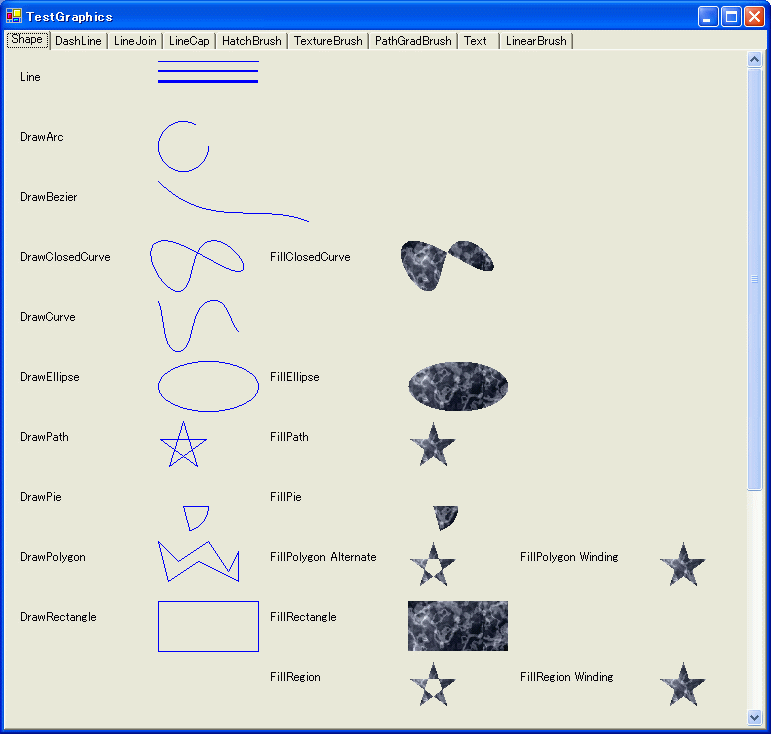
| 注意 |
FillPolygon, FillRegion
を見てください。同じ星のパスに対して、実行していますが、FillMode が Winding, Alternate で
線分が交差した場合の塗りつぶし方が異なります。 |
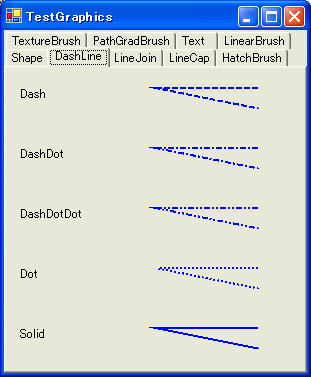
線分はでは、破線にすることができます。破線の種類には、次のようなものがあります。
また、独自の破線を定義することもできます。
| Pen により破線を描く。 |
Graphics g = e.Graphics;
Point [] points = {new Point(100, 10), new Point(0, 10), new
Point(100, 30)};
Pen pen = new Pen(Color.Blue, 2.0F);
pen.DashStyle = DashStyle.Dash;
g.DrawLines(pen, points); |
線分の接続部分の形状を指定することができます。
ただし、ある程度線分が太くないと、どのような形状なのかわかりません。
| 線分の接続形を指定する。 |
Point [] points = {new Point(100, 20), new Point(50, 20), new
Point(100, 40)};
Pen pen = new Pen(Color.Blue, 15.0F);
pen.LineJoin = LineJoin.Bevel;
g.DrawLines(pen, points); |
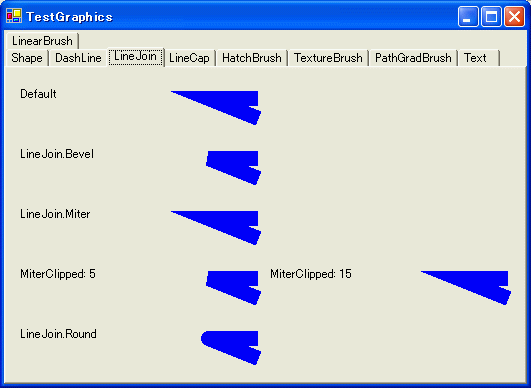
| 注意 |
| MiterClipped の場合は、Pen.MiterLimit
でスレッショルドを指定し、どのぐらいでクリップするのか指定します。 |
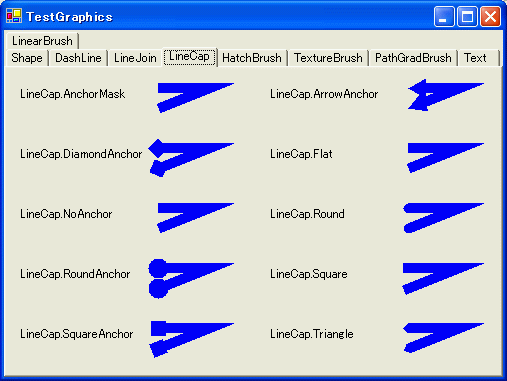
線分の終端形状をPen.StartCap、Pen.EndCapで指定することができます。
ただし、ある程度線分が太くないと、どのような形状なのかわかりません。
| 線分の接続形を指定する。 |
Graphics g = e.Graphics;
Point [] points = {new Point(0, 10), new Point(50, 10), new Point(0,
30)};
Pen pen = new Pen(Color.Blue, 10.0F);
pen.StartCap = pen.EndCap = LineCap.Round;
g.DrawLines(pen, points);
|
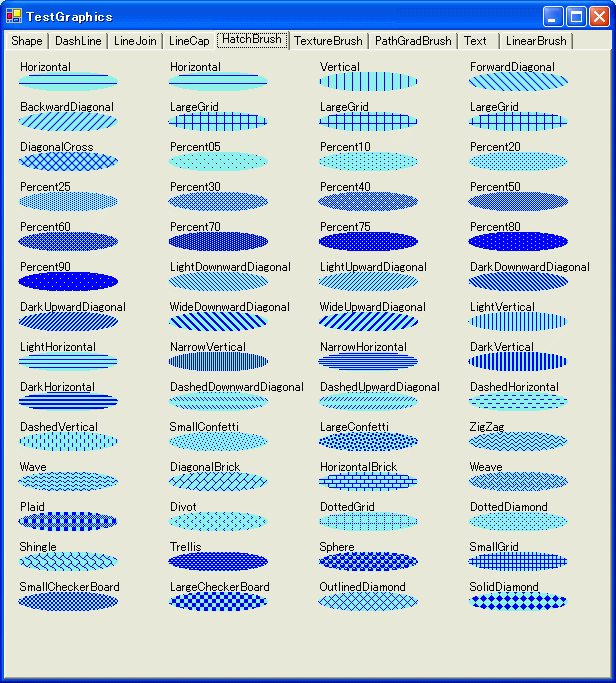
ブラシには、ハッチブラシという模様の入ったブラシがあります。
デフォルトで下図のようなハッチブラシが用意されています。
| ハッチブラシを指定して、塗りつぶす |
Graphics g = e.Graphics;
HatchBrush hb = new HatchBrush(HatchStyle.Horizontal, Color.Blue,
Color.FromArgb(100, Color.Cyan));
g.DrawString(hatchStyle.ToString(), this.Font, new
SolidBrush(Color.Black), x + 10, y);
g.FillEllipse(hb, x + 10, y + 10, 100, 20);
|
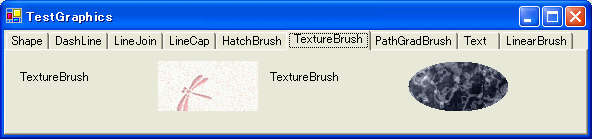
ビットマップイメージからテクスチャーブラシを作成し、それで塗りつぶすことができます。
| ハッチブラシを指定して、塗りつぶす |
Graphics g = e.Graphics;
Image texture = new Bitmap(@"..\..\texture.gif");
Brush textureBrush = new TextureBrush(texture);
g.FillRectangle(textureBrush, 0, 0, 100, 50);
|
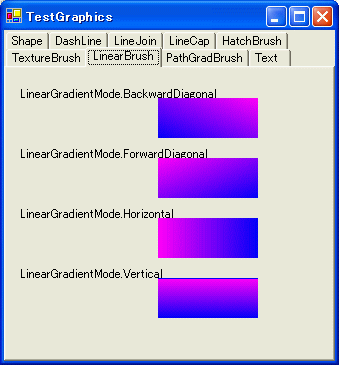
リニアグラデーションブラシを作成し、それで塗りつぶすことができます。
このとき、LinearGradientMode を指定することにより、グラデーションの方向を指定することができます。
方向は、縦横斜めの4方向を指定できます。
| リニアブラシを指定して、塗りつぶす |
Graphics g = e.Graphics;
Rectangle r = new Rectangle(0, 20, 100, 40);
LinearGradientBrush lbBD = new LinearGradientBrush(r, Color.Magenta,
Color.Blue,
LinearGradientMode.BackwardDiagonal);
g.FillRectangle(lbBD, r); |
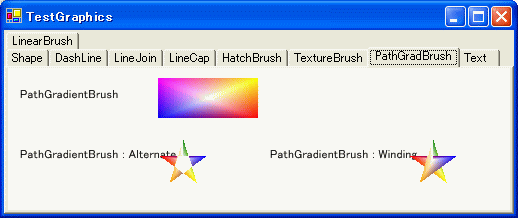
パスグラデーションブラシを作成し、それで塗りつぶすことができます。
パスグラデーションブラシでは、各頂点ごとに色を指定できます。
次の図の四角形の例では、4つの頂点がありますから、ブラシの SurroundColors に
要素数4つのColor配列で、マゼンタ、イエロー、レッド、ブルーを指定しています。
| 注意 |
| 頂点数と、SurroundColors
の要素数が一致していないと、例外が上がります。 |
| パスグラデーションブラシを指定して、塗りつぶす |
Graphics g = e.Graphics;
GraphicsPath path = new GraphicsPath();
path.AddLines(new Point[] {new Point(0, 0), new Point(100, 0), new
Point(100, 40), new Point(0, 40)} );
PathGradientBrush pgRect = new PathGradientBrush(path);
pgRect.SurroundColors = new Color[] {
Color.Magenta,
Color.Yellow,
Color.Red,
Color.Blue,
};
g.FillPath(pgRect, path);
|
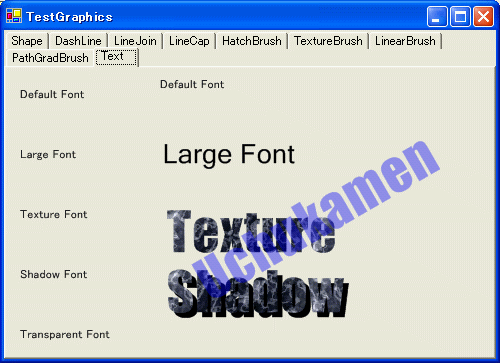
DrawString でテキストを表示できます。
| 注意 |
| TextRenderingHint でアンチエリアシングの指定ができます。 |
| リニアブラシを指定して、塗りつぶす |
Graphics g = e.Graphics;
g.TextRenderingHint =
System.Drawing.Text.TextRenderingHint.AntiAlias;
g.DrawString("Default Font", this.Font, new SolidBrush(Color.Black),
0, 0);
g.DrawString("Large Font", new Font("New Times Roman", 20.0F), new
SolidBrush(Color.Black), 0, 0);
TextureBrush textureBrush = new TextureBrush(new
Bitmap(@"..\..\marble.gif"));
g.DrawString("Texture", new Font("Impact", 40.0F), textureBrush, 0,
0);
g.DrawString("Shadow", new Font("Impact", 40.0F), new
SolidBrush(Color.Black), 5, 5);
g.DrawString("Shadow", new Font("Impact", 40.0F), textureBrush, 0,
0);
g.RotateTransform(-30.0F, MatrixOrder.Append);
Color transparentRed = Color.FromArgb(100, Color.Blue);
g.DrawString("Uchukamen", new Font("Impact", 40.0F), new
SolidBrush(transparentRed), -100, 0); |
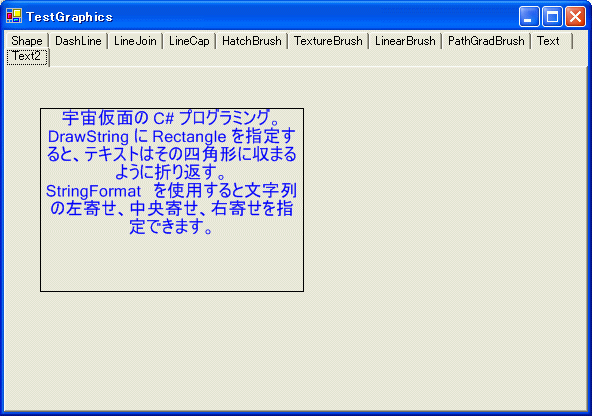
DrawString に Rectangle を指定すると、テキストはその四角形に収まるように折り返すことができます。
また、StringFormat を使用すると文字列の左寄せ、中央寄せ、右寄せを指定できます。
| リニアブラシを指定して、塗りつぶす |
Graphics g = e.Graphics;
g.TextRenderingHint =
System.Drawing.Text.TextRenderingHint.AntiAlias;
Font font = new Font("MS Pゴシック", 12);
StringFormat format = new StringFormat();
format.Alignment=StringAlignment.Center;
string str ="C# プログラミング。"
+ "DrawString に Rectangle を指定すると、テキストはその四角形に収まるように折り返す。\n"
+ "StringFormat を使用すると文字列の左寄せ、中央寄せ、右寄せを指定できます。\n";
g.DrawString(str, font, new SolidBrush(Color.Blue),
this.pictureBox8.ClientRectangle, format); |
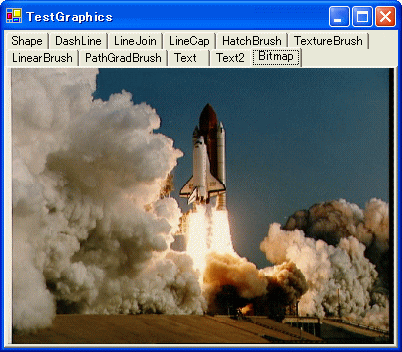
DrawImage( Bitmap )で画像を表示できます。
画像フォーマットは、、.jpeg、.png、.gif、.bmp、.tiff、.exif、 .icon がサポートされています。
| JPEGファイルをロードして、表示する。 |
Graphics g = e.Graphics;
g.DrawImage(new Bitmap(@"..\..\Shuttle.jpg"),
this.pictureBox9.ClientRectangle); |
See NASA Copyright Notification
よく使うパターンをメモっておきます。
| Imageファイルをオープンするダイアログ |
private Bitmap = null;

OpenFileDialog openFileDialog1 = new OpenFileDialog();

openFileDialog1.InitialDirectory = "c:\\" ;
openFileDialog1.Filter =
    "JPEG files (*.jpg)|*.jpg|GIF files (*.gif)|*.gif|Bitmap files (*.bmp)|*.bmp|All files (*.*)|*.*" ;
openFileDialog1.FilterIndex = 1 ;

if(openFileDialog1.ShowDialog() == DialogResult.OK)
{
    bitmap = new Bitmap(openFileDialog1.FileName);
}
|
| 画像ファイルをリサイズして、セーブする。 |
Bitmap resizedImage = new Bitmap( originalImage, width, height);
resizedImage.Save(filename);
|
| 画像ファイルを補間モードを指定したリサイズを行い、セーブする。 |
Bitmap SrcImage = (Bitmap)Bitmap.FromFile(SrcImageFile);
Bitmap DstImage = new Bitmap(width, height);
Graphics g = Graphics.FromImage(DstImage);

g.InterpolationMode = InterpolationMode.HighQualityBicubic;
g.DrawImage(SrcImage, new Rectangle(0,0,width,height), SrcImage.Width, SrcImage.Height, GraphicsUnit.Pixel);
DstImage.Save(DstImageFile, ImageFormat.Jpeg);
|
| JPEG のクオリティを指定して画像をセーブする。 |
int quality = 50;
ImageCodecInfo encoder = null;
ImageCodecInfo[] encoderInfos = System.Drawing.Imaging.ImageCodecInfo.GetImageEncoders();
foreach (ImageCodecInfo encInfo in encoderInfos)
{
    if (encInfo.MimeType == "image/jpeg")
    {
        encoder = encInfo;
        break;
    }
}
if (encoder == null)
    throw new Exception("Encoder not found");

EncoderParameters encParams = new EncoderParameters( 1 );
encParams.Param[0] = new EncoderParameter( Encoder.Quality, (long) quality );

Bitmap bitmap = new Bitmap("source.jpg");
bitmap.Save("result.jpg", encoder, encParams);
|
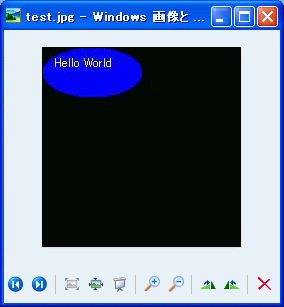
Bitmap を作成して、Bitmap の Graphics に対して描画を行い、Bitmap.Save(..)
メソッドにより、
描画した結果をフォーマットを指定してファイルにセーブできます。
| JPEGファイルをロードして、表示する。 |
Bitmap bmp = new Bitmap(200,200,
System.Drawing.Imaging.PixelFormat.Format32bppArgb);
Graphics g = Graphics.FromImage(bmp);
g.FillEllipse(new SolidBrush(Color.Blue), 0, 0, 100, 50);
g.DrawString("Hello World", this.Font, new SolidBrush(Color.Yellow),
10, 10);
bmp.Save("test.jpg", System.Drawing.Imaging.ImageFormat.Jpeg); |
実行結果
Graphics.SmoothingMode プロパティ
テキストとグラフィックスのアンチ エイリアシングを設定できます。 |
| AntiAlias | アンチエイリアス |
| Default | デフォルト |
| HighQuality | 低速だが高品質 |
| HighSpeed | 高速だが低品質 |
| Invalid | 無効なモード |
| None | アンチエリアシングしない |
|
|
コントロールまたはフォームのサイズが変更されても、Paint イベントは発生しません。
フォームのサイズが変更されたときに Paint イベントを発生させるには、コントロールのスタイルを設定します。
Form.SetStyle( ControlStyles.ResizeRedraw,true ); |
|
|
Paint イベントの引数 (PaintEventArgs) から得られる Graphics
オブジェクトは、
Paint イベント ハンドラから戻った時点で破棄されます。
したがって、Paint イベントのスコープの外で、この Graphics オブジェクトを使用してはいけません。 |
2002/12/26 初版作成
using System;
using System.Drawing;
using System.Collections;
using System.ComponentModel;
using System.Windows.Forms;
using System.Data;
using System.Drawing.Drawing2D;
namespace TestGraphics1
{
/// <summary>
/// Form1 の概要の説明です。
/// </summary>
public class Form1 : System.Windows.Forms.Form
{
private System.Windows.Forms.TabControl tabControl1;
private System.Windows.Forms.TabPage tabHatchBrush;
private System.Windows.Forms.PictureBox picBoxForHatchBrush;
private System.Windows.Forms.PictureBox picBoxLine;
private System.Windows.Forms.TabPage tabLineCap;
private System.Windows.Forms.PictureBox pictureBox1;
private System.Windows.Forms.TabPage tabPageLineDash;
private System.Windows.Forms.PictureBox pictureBox2;
private System.Windows.Forms.TabPage tabPageTextureBrush;
private System.Windows.Forms.PictureBox pictureBox3;
private System.Windows.Forms.TabPage tabPageLinearBrush;
private System.Windows.Forms.PictureBox pictureBox4;
private System.Windows.Forms.TabPage tabPagePathGradBrush;
private System.Windows.Forms.PictureBox pictureBox5;
private System.Windows.Forms.TabPage tabLineJoin;
private System.Windows.Forms.TabPage tabPageText;
private System.Windows.Forms.PictureBox pictureBox6;
private System.Windows.Forms.TabPage tabPageShape;
private System.Windows.Forms.PictureBox pictureBox7;
private System.Windows.Forms.TabPage tabPageTextBox;
private System.Windows.Forms.PictureBox pictureBox8;
private System.Windows.Forms.TabPage tabPageBitmap;
private System.Windows.Forms.PictureBox pictureBox9;
private System.Windows.Forms.TabPage tabPageSaveImage;
private System.Windows.Forms.Button btnSaveImage;
/// <summary>
/// 必要なデザイナ変数です。
/// </summary>
private System.ComponentModel.Container components = null;
public Form1()
{
//
// Windows フォーム デザイナ サポートに必要です。
//
InitializeComponent();
//
// TODO: InitializeComponent 呼び出しの後に、コンストラクタ コードを追加してください。
//
CreateStarPath(50, 50);
}
/// <summary>
/// 使用されているリソースに後処理を実行します。
/// </summary>
protected override void Dispose( bool disposing )
{
if( disposing )
{
if (components != null)
{
components.Dispose();
}
}
base.Dispose( disposing );
}
#region Windows Form Designer generated code
/// <summary>
/// デザイナ サポートに必要なメソッドです。このメソッドの内容を
/// コード エディタで変更しないでください。
/// </summary>
private void InitializeComponent()
{
this.picBoxForHatchBrush = new System.Windows.Forms.PictureBox();
this.tabControl1 = new System.Windows.Forms.TabControl();
this.tabPageShape = new System.Windows.Forms.TabPage();
this.pictureBox7 = new System.Windows.Forms.PictureBox();
this.tabPageLineDash = new System.Windows.Forms.TabPage();
this.pictureBox2 = new System.Windows.Forms.PictureBox();
this.tabLineJoin = new System.Windows.Forms.TabPage();
this.picBoxLine = new System.Windows.Forms.PictureBox();
this.tabLineCap = new System.Windows.Forms.TabPage();
this.pictureBox1 = new System.Windows.Forms.PictureBox();
this.tabHatchBrush = new System.Windows.Forms.TabPage();
this.tabPageTextureBrush = new System.Windows.Forms.TabPage();
this.pictureBox3 = new System.Windows.Forms.PictureBox();
this.tabPageLinearBrush = new System.Windows.Forms.TabPage();
this.pictureBox4 = new System.Windows.Forms.PictureBox();
this.tabPagePathGradBrush = new System.Windows.Forms.TabPage();
this.pictureBox5 = new System.Windows.Forms.PictureBox();
this.tabPageText = new System.Windows.Forms.TabPage();
this.pictureBox6 = new System.Windows.Forms.PictureBox();
this.tabPageTextBox = new System.Windows.Forms.TabPage();
this.pictureBox8 = new System.Windows.Forms.PictureBox();
this.tabPageBitmap = new System.Windows.Forms.TabPage();
this.pictureBox9 = new System.Windows.Forms.PictureBox();
this.tabPageSaveImage = new System.Windows.Forms.TabPage();
this.btnSaveImage = new System.Windows.Forms.Button();
this.tabControl1.SuspendLayout();
this.tabPageShape.SuspendLayout();
this.tabPageLineDash.SuspendLayout();
this.tabLineJoin.SuspendLayout();
this.tabLineCap.SuspendLayout();
this.tabHatchBrush.SuspendLayout();
this.tabPageTextureBrush.SuspendLayout();
this.tabPageLinearBrush.SuspendLayout();
this.tabPagePathGradBrush.SuspendLayout();
this.tabPageText.SuspendLayout();
this.tabPageTextBox.SuspendLayout();
this.tabPageBitmap.SuspendLayout();
this.tabPageSaveImage.SuspendLayout();
this.SuspendLayout();
//
// picBoxForHatchBrush
//
this.picBoxForHatchBrush.Dock = System.Windows.Forms.DockStyle.Top;
this.picBoxForHatchBrush.Name = "picBoxForHatchBrush";
this.picBoxForHatchBrush.Size = new System.Drawing.Size(576, 152);
this.picBoxForHatchBrush.TabIndex = 1;
this.picBoxForHatchBrush.TabStop = false;
this.picBoxForHatchBrush.Paint += new System.Windows.Forms.PaintEventHandler(this.picBoxHatch_Paint);
//
// tabControl1
//
this.tabControl1.Controls.AddRange(new System.Windows.Forms.Control[] {
this.tabPageShape,
this.tabPageLineDash,
this.tabLineJoin,
this.tabLineCap,
this.tabHatchBrush,
this.tabPageTextureBrush,
this.tabPageLinearBrush,
this.tabPagePathGradBrush,
this.tabPageText,
this.tabPageTextBox,
this.tabPageBitmap,
this.tabPageSaveImage});
this.tabControl1.Dock = System.Windows.Forms.DockStyle.Fill;
this.tabControl1.Multiline = true;
this.tabControl1.Name = "tabControl1";
this.tabControl1.SelectedIndex = 0;
this.tabControl1.Size = new System.Drawing.Size(584, 382);
this.tabControl1.TabIndex = 2;
//
// tabPageShape
//
this.tabPageShape.AutoScroll = true;
this.tabPageShape.Controls.AddRange(new System.Windows.Forms.Control[] {
this.pictureBox7});
this.tabPageShape.Location = new System.Drawing.Point(4, 38);
this.tabPageShape.Name = "tabPageShape";
this.tabPageShape.Size = new System.Drawing.Size(576, 340);
this.tabPageShape.TabIndex = 8;
this.tabPageShape.Text = "Shape";
//
// pictureBox7
//
this.pictureBox7.Dock = System.Windows.Forms.DockStyle.Top;
this.pictureBox7.Name = "pictureBox7";
this.pictureBox7.Size = new System.Drawing.Size(576, 302);
this.pictureBox7.TabIndex = 0;
this.pictureBox7.TabStop = false;
this.pictureBox7.Paint += new System.Windows.Forms.PaintEventHandler(this.pictureBox7_Paint);
//
// tabPageLineDash
//
this.tabPageLineDash.Controls.AddRange(new System.Windows.Forms.Control[] {
this.pictureBox2});
this.tabPageLineDash.Location = new System.Drawing.Point(4, 21);
this.tabPageLineDash.Name = "tabPageLineDash";
this.tabPageLineDash.Size = new System.Drawing.Size(576, 357);
this.tabPageLineDash.TabIndex = 3;
this.tabPageLineDash.Text = "DashLine";
//
// pictureBox2
//
this.pictureBox2.Dock = System.Windows.Forms.DockStyle.Fill;
this.pictureBox2.Name = "pictureBox2";
this.pictureBox2.Size = new System.Drawing.Size(576, 357);
this.pictureBox2.TabIndex = 0;
this.pictureBox2.TabStop = false;
this.pictureBox2.Paint += new System.Windows.Forms.PaintEventHandler(this.pictureBox2_Paint);
//
// tabLineJoin
//
this.tabLineJoin.AutoScroll = true;
this.tabLineJoin.Controls.AddRange(new System.Windows.Forms.Control[] {
this.picBoxLine});
this.tabLineJoin.Location = new System.Drawing.Point(4, 21);
this.tabLineJoin.Name = "tabLineJoin";
this.tabLineJoin.Size = new System.Drawing.Size(576, 357);
this.tabLineJoin.TabIndex = 0;
this.tabLineJoin.Text = "LineJoin";
//
// picBoxLine
//
this.picBoxLine.Dock = System.Windows.Forms.DockStyle.Fill;
this.picBoxLine.Name = "picBoxLine";
this.picBoxLine.Size = new System.Drawing.Size(576, 357);
this.picBoxLine.TabIndex = 0;
this.picBoxLine.TabStop = false;
this.picBoxLine.Paint += new System.Windows.Forms.PaintEventHandler(this.picBoxLine_Paint);
//
// tabLineCap
//
this.tabLineCap.Controls.AddRange(new System.Windows.Forms.Control[] {
this.pictureBox1});
this.tabLineCap.Location = new System.Drawing.Point(4, 21);
this.tabLineCap.Name = "tabLineCap";
this.tabLineCap.Size = new System.Drawing.Size(576, 357);
this.tabLineCap.TabIndex = 2;
this.tabLineCap.Text = "LineCap";
//
// pictureBox1
//
this.pictureBox1.Dock = System.Windows.Forms.DockStyle.Fill;
this.pictureBox1.Name = "pictureBox1";
this.pictureBox1.Size = new System.Drawing.Size(576, 357);
this.pictureBox1.TabIndex = 0;
this.pictureBox1.TabStop = false;
this.pictureBox1.Paint += new System.Windows.Forms.PaintEventHandler(this.pictureBox1_Paint_1);
//
// tabHatchBrush
//
this.tabHatchBrush.AutoScroll = true;
this.tabHatchBrush.Controls.AddRange(new System.Windows.Forms.Control[] {
this.picBoxForHatchBrush});
this.tabHatchBrush.Location = new System.Drawing.Point(4, 21);
this.tabHatchBrush.Name = "tabHatchBrush";
this.tabHatchBrush.Size = new System.Drawing.Size(576, 357);
this.tabHatchBrush.TabIndex = 1;
this.tabHatchBrush.Text = "HatchBrush";
//
// tabPageTextureBrush
//
this.tabPageTextureBrush.Controls.AddRange(new System.Windows.Forms.Control[] {
this.pictureBox3});
this.tabPageTextureBrush.Location = new System.Drawing.Point(4, 21);
this.tabPageTextureBrush.Name = "tabPageTextureBrush";
this.tabPageTextureBrush.Size = new System.Drawing.Size(576, 357);
this.tabPageTextureBrush.TabIndex = 4;
this.tabPageTextureBrush.Text = "TextureBrush";
//
// pictureBox3
//
this.pictureBox3.Dock = System.Windows.Forms.DockStyle.Fill;
this.pictureBox3.Name = "pictureBox3";
this.pictureBox3.Size = new System.Drawing.Size(576, 357);
this.pictureBox3.TabIndex = 0;
this.pictureBox3.TabStop = false;
this.pictureBox3.Paint += new System.Windows.Forms.PaintEventHandler(this.pictureBox3_Paint);
//
// tabPageLinearBrush
//
this.tabPageLinearBrush.Controls.AddRange(new System.Windows.Forms.Control[] {
this.pictureBox4});
this.tabPageLinearBrush.Location = new System.Drawing.Point(4, 21);
this.tabPageLinearBrush.Name = "tabPageLinearBrush";
this.tabPageLinearBrush.Size = new System.Drawing.Size(576, 357);
this.tabPageLinearBrush.TabIndex = 5;
this.tabPageLinearBrush.Text = "LinearBrush";
//
// pictureBox4
//
this.pictureBox4.Name = "pictureBox4";
this.pictureBox4.Size = new System.Drawing.Size(536, 319);
this.pictureBox4.TabIndex = 0;
this.pictureBox4.TabStop = false;
this.pictureBox4.Paint += new System.Windows.Forms.PaintEventHandler(this.pictureBox4_Paint);
//
// tabPagePathGradBrush
//
this.tabPagePathGradBrush.Controls.AddRange(new System.Windows.Forms.Control[] {
this.pictureBox5});
this.tabPagePathGradBrush.Location = new System.Drawing.Point(4, 21);
this.tabPagePathGradBrush.Name = "tabPagePathGradBrush";
this.tabPagePathGradBrush.Size = new System.Drawing.Size(576, 357);
this.tabPagePathGradBrush.TabIndex = 6;
this.tabPagePathGradBrush.Text = "PathGradBrush";
//
// pictureBox5
//
this.pictureBox5.Dock = System.Windows.Forms.DockStyle.Fill;
this.pictureBox5.Name = "pictureBox5";
this.pictureBox5.Size = new System.Drawing.Size(576, 357);
this.pictureBox5.TabIndex = 0;
this.pictureBox5.TabStop = false;
this.pictureBox5.Paint += new System.Windows.Forms.PaintEventHandler(this.pictureBox5_Paint);
//
// tabPageText
//
this.tabPageText.Controls.AddRange(new System.Windows.Forms.Control[] {
this.pictureBox6});
this.tabPageText.Location = new System.Drawing.Point(4, 21);
this.tabPageText.Name = "tabPageText";
this.tabPageText.Size = new System.Drawing.Size(576, 357);
this.tabPageText.TabIndex = 7;
this.tabPageText.Text = "Text";
//
// pictureBox6
//
this.pictureBox6.Dock = System.Windows.Forms.DockStyle.Fill;
this.pictureBox6.Name = "pictureBox6";
this.pictureBox6.Size = new System.Drawing.Size(576, 357);
this.pictureBox6.TabIndex = 0;
this.pictureBox6.TabStop = false;
this.pictureBox6.Paint += new System.Windows.Forms.PaintEventHandler(this.pictureBox6_Paint);
//
// tabPageTextBox
//
this.tabPageTextBox.Controls.AddRange(new System.Windows.Forms.Control[] {
this.pictureBox8});
this.tabPageTextBox.Location = new System.Drawing.Point(4, 38);
this.tabPageTextBox.Name = "tabPageTextBox";
this.tabPageTextBox.Size = new System.Drawing.Size(576, 340);
this.tabPageTextBox.TabIndex = 9;
this.tabPageTextBox.Text = "Text2";
//
// pictureBox8
//
this.pictureBox8.BorderStyle = System.Windows.Forms.BorderStyle.FixedSingle;
this.pictureBox8.Location = new System.Drawing.Point(32, 40);
this.pictureBox8.Name = "pictureBox8";
this.pictureBox8.Size = new System.Drawing.Size(264, 184);
this.pictureBox8.TabIndex = 0;
this.pictureBox8.TabStop = false;
this.pictureBox8.Paint += new System.Windows.Forms.PaintEventHandler(this.pictureBox8_Paint);
//
// tabPageBitmap
//
this.tabPageBitmap.Controls.AddRange(new System.Windows.Forms.Control[] {
this.pictureBox9});
this.tabPageBitmap.Location = new System.Drawing.Point(4, 38);
this.tabPageBitmap.Name = "tabPageBitmap";
this.tabPageBitmap.Size = new System.Drawing.Size(576, 340);
this.tabPageBitmap.TabIndex = 10;
this.tabPageBitmap.Text = "Bitmap";
//
// pictureBox9
//
this.pictureBox9.Dock = System.Windows.Forms.DockStyle.Fill;
this.pictureBox9.Name = "pictureBox9";
this.pictureBox9.Size = new System.Drawing.Size(576, 340);
this.pictureBox9.TabIndex = 0;
this.pictureBox9.TabStop = false;
this.pictureBox9.Paint += new System.Windows.Forms.PaintEventHandler(this.pictureBox9_Paint);
//
// tabPageSaveImage
//
this.tabPageSaveImage.Controls.AddRange(new System.Windows.Forms.Control[] {
this.btnSaveImage});
this.tabPageSaveImage.Location = new System.Drawing.Point(4, 38);
this.tabPageSaveImage.Name = "tabPageSaveImage";
this.tabPageSaveImage.Size = new System.Drawing.Size(576, 340);
this.tabPageSaveImage.TabIndex = 11;
this.tabPageSaveImage.Text = "SaveImage";
//
// btnSaveImage
//
this.btnSaveImage.Location = new System.Drawing.Point(72, 56);
this.btnSaveImage.Name = "btnSaveImage";
this.btnSaveImage.Size = new System.Drawing.Size(104, 32);
this.btnSaveImage.TabIndex = 0;
this.btnSaveImage.Text = "SaveImage";
this.btnSaveImage.Click += new System.EventHandler(this.btnSaveImage_Click);
//
// Form1
//
this.AutoScaleBaseSize = new System.Drawing.Size(5, 12);
this.ClientSize = new System.Drawing.Size(584, 382);
this.Controls.AddRange(new System.Windows.Forms.Control[] {
this.tabControl1});
this.Name = "Form1";
this.Text = "TestGraphics";
this.tabControl1.ResumeLayout(false);
this.tabPageShape.ResumeLayout(false);
this.tabPageLineDash.ResumeLayout(false);
this.tabLineJoin.ResumeLayout(false);
this.tabLineCap.ResumeLayout(false);
this.tabHatchBrush.ResumeLayout(false);
this.tabPageTextureBrush.ResumeLayout(false);
this.tabPageLinearBrush.ResumeLayout(false);
this.tabPagePathGradBrush.ResumeLayout(false);
this.tabPageText.ResumeLayout(false);
this.tabPageTextBox.ResumeLayout(false);
this.tabPageBitmap.ResumeLayout(false);
this.tabPageSaveImage.ResumeLayout(false);
this.ResumeLayout(false);
}
#endregion
/// <summary>
/// アプリケーションのメイン エントリ ポイントです。
/// </summary>
[STAThread]
static void Main()
{
Application.Run(new Form1());
}
private PointF[] starPoints = null;
private GraphicsPath starPath = null;
private void CreateStarPath(int w, int h)
{
int r = System.Math.Min(w, h)/2;
Point [] stars = new Point[] {
new Point((int)(r*Math.Sin(Math.PI*2*0.0)), (int)(r*-Math.Cos(Math.PI*2*0))),
new Point((int)(r*Math.Sin(Math.PI*2*2/5)), (int)(r*-Math.Cos(Math.PI*2*2/5))),
new Point((int)(r*Math.Sin(Math.PI*2*4/5)), (int)(r*-Math.Cos(Math.PI*2*4/5))),
new Point((int)(r*Math.Sin(Math.PI*2*1/5)), (int)(r*-Math.Cos(Math.PI*2*1/5))),
new Point((int)(r*Math.Sin(Math.PI*2*3/5)), (int)(r*-Math.Cos(Math.PI*2*3/5))),
new Point((int)(r*Math.Sin(Math.PI*2*0.0)), (int)(r*-Math.Cos(Math.PI*2*0)))
};
starPath = new GraphicsPath();
starPath.AddLines(stars);
starPath.Transform(new System.Drawing.Drawing2D.Matrix(1,0,0,1,r,r));
starPoints = starPath.PathPoints;
}
// col, row で、カラム、行を指定して、座標系を移動するためのメソッド
static private GraphicsState gstate = null;
private void MoveTo(Graphics g, int col, int row, string comment)
{
if(gstate != null)
g.Restore(gstate);
gstate = g.Save();
g.TranslateTransform(col * 250, row * 60 + 10, MatrixOrder.Append);
g.DrawString(comment, this.Font, new SolidBrush(Color.Black), 10, 10);
g.TranslateTransform(150, 0, MatrixOrder.Append);
}
private void EndMoveTo(Graphics g)
{
if(gstate != null)
{
g.Restore(gstate);
gstate = null;
}
}
// Shape
private void pictureBox7_Paint(object sender, System.Windows.Forms.PaintEventArgs e)
{
this.pictureBox7.Height = 1024;
Graphics g = e.Graphics;
MoveTo(g, 0, 0, "Line");
g.DrawLine(new Pen(Color.Blue), new Point(0, 0), new Point(100, 0));
g.DrawLine(new Pen(Color.Blue, 2.0F), new Point(0, 10), new Point(100, 10));
g.DrawLine(new Pen(Color.Blue, 3.0F), new Point(0, 20), new Point(100, 20));
MoveTo(g, 0, 1, "DrawArc");
g.DrawArc(new Pen(Color.Blue), 0, 0, 50, 50, 0, 300);
MoveTo(g, 0, 2, "DrawBezier");
g.DrawBezier(new Pen(Color.Blue),
new Point(0, 0), new Point(50, 50), new Point(100, 20), new Point(150, 40));
MoveTo(g, 0, 3, "DrawClosedCurve");
Point [] curPoints = {new Point(0, 0), new Point(20, 50), new Point(50, 0), new Point(80, 30)};
Point [] points = {new Point(0, 0), new Point(20, 20), new Point(50, 0), new Point(70, 30),
new Point(80, 10), new Point(80, 40), new Point(40, 20), new Point(10, 40)};
g.DrawClosedCurve(new Pen(Color.Blue), curPoints, 1.0F, FillMode.Alternate);
MoveTo(g, 0, 4, "DrawCurve");
g.DrawCurve(new Pen(Color.Blue), curPoints, 1.0F);
MoveTo(g, 0, 5, "DrawEllipse");
g.DrawEllipse(new Pen(Color.Blue), 0, 0, 100, 50);
MoveTo(g, 0, 6, "DrawPath");
g.DrawPath(new Pen(Color.Blue), this.starPath);
MoveTo(g, 0, 7, "DrawPie");
g.DrawPie(new Pen(Color.Blue), 0, 0, 50, 50, 0, 75);
MoveTo(g, 0, 8, "DrawPolygon");
g.DrawPolygon(new Pen(Color.Blue), points);
MoveTo(g, 0, 9, "DrawRectangle");
g.DrawRectangle(new Pen(Color.Blue), 0, 0, 100, 50);
Image texture = new Bitmap(@"..\..\marble.gif");
Brush textureBrush = new TextureBrush(texture);
MoveTo(g, 1, 3, "FillClosedCurve");
g.FillClosedCurve(textureBrush, curPoints, FillMode.Alternate, 1.0F);
MoveTo(g, 1, 5, "FillEllipse");
g.FillEllipse(textureBrush, 0, 0, 100, 50);
MoveTo(g, 1, 6, "FillPath");
g.FillPath(textureBrush, this.starPath);
MoveTo(g, 1, 7, "FillPie");
g.FillPie(textureBrush, 0, 0, 50, 50, 0, 75);
MoveTo(g, 1, 8, "FillPolygon Alternate");
g.FillPolygon(textureBrush, starPoints, FillMode.Alternate);
MoveTo(g, 2, 8, "FillPolygon Winding");
g.FillPolygon(textureBrush, starPoints, FillMode.Winding);
MoveTo(g, 1, 9, "FillRectangle");
g.FillRectangle(textureBrush, 0, 0, 100, 50);
MoveTo(g, 1, 10, "FillRegion");
this.starPath.FillMode = FillMode.Alternate;
g.FillRegion(textureBrush, new Region(this.starPath));
MoveTo(g, 2, 10, "FillRegion Winding");
this.starPath.FillMode = FillMode.Winding;
g.FillRegion(textureBrush, new Region(this.starPath));
EndMoveTo(g);
}
// ダッシュライン
private void pictureBox2_Paint(object sender, System.Windows.Forms.PaintEventArgs e)
{
Graphics g = e.Graphics;
Point [] points = {new Point(100, 10), new Point(0, 10), new Point(100, 30)};
Pen pen = new Pen(Color.Blue, 2.0F);
this.MoveTo(g, 0, 0, "Dash");
pen.DashStyle = DashStyle.Dash;
g.DrawLines(pen, points);
this.MoveTo(g, 0, 1, "DashDot");
pen.DashStyle = DashStyle.DashDot;
g.DrawLines(pen, points);
this.MoveTo(g, 0, 2, "DashDotDot");
pen.DashStyle = DashStyle.DashDotDot;
g.DrawLines(pen, points);
this.MoveTo(g, 0, 3, "Dot");
pen.DashStyle = DashStyle.Dot;
g.DrawLines(pen, points);
this.MoveTo(g, 0, 4, "Solid");
pen.DashStyle = DashStyle.Solid;
g.DrawLines(pen, points);
EndMoveTo(g);
}
// ラインジョイン
private void picBoxLine_Paint(object sender, System.Windows.Forms.PaintEventArgs e)
{
Graphics g = e.Graphics;
Point [] points = {new Point(100, 20), new Point(50, 20), new Point(100, 40)};
Pen pen = new Pen(Color.Blue, 15.0F);
this.MoveTo(g, 0, 0, "Default");
g.DrawLines(pen, points);
this.MoveTo(g, 0, 1, "LineJoin.Bevel");
pen.LineJoin = LineJoin.Bevel;
g.DrawLines(pen, points);
this.MoveTo(g, 0, 2, "LineJoin.Miter");
pen.LineJoin = LineJoin.Miter;
g.DrawLines(pen, points);
this.MoveTo(g, 0, 3, "MiterClipped: 5");
pen.LineJoin = LineJoin.MiterClipped;
pen.MiterLimit = 5;
g.DrawLines(pen, points);
this.MoveTo(g, 1, 3, "MiterClipped: 15");
pen.LineJoin = LineJoin.MiterClipped;
pen.MiterLimit = 15;
g.DrawLines(pen, points);
this.MoveTo(g, 0, 4, "LineJoin.Round");
pen.LineJoin = LineJoin.Round;
g.DrawLines(pen, points);
EndMoveTo(g);
}
// ラインキャップ
private void pictureBox1_Paint_1(object sender, System.Windows.Forms.PaintEventArgs e)
{
Graphics g = e.Graphics;
Point [] points = {new Point(0, 10), new Point(50, 10), new Point(0, 30)};
Pen pen = new Pen(Color.Blue, 10.0F);
this.MoveTo(g, 0, 0, "LineCap.AnchorMask");
pen.StartCap = pen.EndCap = LineCap.AnchorMask;
g.DrawLines(pen, points);
this.MoveTo(g, 1, 0, "LineCap.ArrowAnchor");
pen.StartCap = pen.EndCap = LineCap.ArrowAnchor;
g.DrawLines(pen, points);
this.MoveTo(g, 0, 1, "LineCap.DiamondAnchor");
pen.StartCap = pen.EndCap = LineCap.DiamondAnchor;
g.DrawLines(pen, points);
this.MoveTo(g, 1, 1, "LineCap.Flat");
pen.StartCap = pen.EndCap = LineCap.Flat;
g.DrawLines(pen, points);
this.MoveTo(g, 0, 2, "LineCap.NoAnchor");
pen.StartCap = pen.EndCap = LineCap.NoAnchor;
g.DrawLines(pen, points);
this.MoveTo(g, 1, 2, "LineCap.Round");
pen.StartCap = pen.EndCap = LineCap.Round;
g.DrawLines(pen, points);
this.MoveTo(g, 0, 3, "LineCap.RoundAnchor");
pen.StartCap = pen.EndCap = LineCap.RoundAnchor;
g.DrawLines(pen, points);
this.MoveTo(g, 1, 3, "LineCap.Square");
pen.StartCap = pen.EndCap = LineCap.Square;
g.DrawLines(pen, points);
this.MoveTo(g, 0, 4, "LineCap.SquareAnchor");
pen.StartCap = pen.EndCap = LineCap.SquareAnchor;
g.DrawLines(pen, points);
this.MoveTo(g, 1, 4, "LineCap.Triangle");
pen.StartCap = pen.EndCap = LineCap.Triangle;
g.DrawLines(pen, points);
EndMoveTo(g);
}
// ハッチブラシ
private void picBoxHatch_Paint(object sender, System.Windows.Forms.PaintEventArgs e)
{
this.picBoxForHatchBrush.Width = this.tabHatchBrush.ClientSize.Width;
Graphics g = e.Graphics;
int x = 0;
int y = 10;
string [] hatchStyleNames = Enum.GetNames(typeof(HatchStyle));
foreach(string hatchStyleStr in hatchStyleNames)
{
HatchStyle hatchStyle = (HatchStyle)Enum.Parse(typeof(HatchStyle), hatchStyleStr);
HatchBrush hb = new HatchBrush(hatchStyle, Color.Blue,
Color.FromArgb(100, Color.Cyan));
g.DrawString(hatchStyle.ToString(), this.Font, new SolidBrush(Color.Black), x + 10, y);
g.FillEllipse(hb, x + 10, y + 10, 100, 20);
x += 150;
if ( x + 100 >= this.picBoxForHatchBrush.Width)
{
x = 0;
y += 40;
}
}
this.picBoxForHatchBrush.Height = y + 50;
}
// テクスチャブラシ
private void pictureBox3_Paint(object sender, System.Windows.Forms.PaintEventArgs e)
{
Graphics g = e.Graphics;
this.MoveTo(g, 0, 0, "TextureBrush");
Image texture = new Bitmap(@"..\..\texture.gif");
Brush textureBrush = new TextureBrush(texture);
g.FillRectangle(textureBrush, 0, 0, 100, 50);
MoveTo(g, 1, 0, "TextureBrush");
Image marble = new Bitmap(@"..\..\marble.gif");
Brush marbleBrush = new TextureBrush(marble);
g.FillEllipse(marbleBrush, 0, 0, 100, 50);
this.EndMoveTo(g);
}
// リニアグラデーション
private void pictureBox4_Paint(object sender, System.Windows.Forms.PaintEventArgs e)
{
Graphics g = e.Graphics;
Rectangle r = new Rectangle(0, 20, 100, 40);
this.MoveTo(g, 0, 0, "LinearGradientMode.BackwardDiagonal");
LinearGradientBrush lbBD = new LinearGradientBrush(r, Color.Magenta, Color.Blue,
LinearGradientMode.BackwardDiagonal);
g.FillRectangle(lbBD, r);
this.MoveTo(g, 0, 1, "LinearGradientMode.ForwardDiagonal");
LinearGradientBrush lbFD = new LinearGradientBrush(r, Color.Magenta, Color.Blue,
LinearGradientMode.ForwardDiagonal);
g.FillRectangle(lbFD, r);
this.MoveTo(g, 0, 2, "LinearGradientMode.Horizontal");
LinearGradientBrush lbH = new LinearGradientBrush(r, Color.Magenta, Color.Blue,
LinearGradientMode.Horizontal);
g.FillRectangle(lbH, r);
this.MoveTo(g, 0, 3, "LinearGradientMode.Vertical");
LinearGradientBrush lbV = new LinearGradientBrush(r, Color.Magenta, Color.Blue,
LinearGradientMode.Vertical);
g.FillRectangle(lbV, r);
EndMoveTo(g);
}
// パスグラデーションブラシ
private void pictureBox5_Paint(object sender, System.Windows.Forms.PaintEventArgs e)
{
Graphics g = e.Graphics;
g.TextRenderingHint = System.Drawing.Text.TextRenderingHint.AntiAlias;
g.FillRectangle(new SolidBrush(Color.FromArgb(180, Color.White)), ClientRectangle);
this.MoveTo(g, 0, 0, "PathGradientBrush");
GraphicsPath path = new GraphicsPath();
path.AddLines(new Point[] {new Point(0, 0), new Point(100, 0), new Point(100, 40), new Point(0, 40)} );
PathGradientBrush pgRect = new PathGradientBrush(path);
pgRect.SurroundColors = new Color[] {
Color.Magenta,
Color.Yellow,
Color.Red,
Color.Blue,
};
g.FillPath(pgRect, path);
this.CreateStarPath(50, 50);
this.MoveTo(g, 0, 1, "PathGradientBrush : Alternate");
PathGradientBrush pgStar = new PathGradientBrush(this.starPath);
pgStar.SurroundColors = new Color[] {
Color.Green,
Color.Yellow,
Color.Red,
Color.Blue,
Color.Orange,
Color.White,
};
g.FillPath(pgStar, this.starPath);
this.MoveTo(g, 1, 1, "PathGradientBrush : Winding");
this.starPath.FillMode = FillMode.Winding;
pgStar = new PathGradientBrush(this.starPath);
pgStar.SurroundColors = new Color[] {
Color.Green,
Color.Yellow,
Color.Red,
Color.Blue,
Color.Orange,
Color.White,
};
g.FillPath(pgStar, this.starPath);
}
// テキスト
private void pictureBox6_Paint(object sender, System.Windows.Forms.PaintEventArgs e)
{
Graphics g = e.Graphics;
g.TextRenderingHint = System.Drawing.Text.TextRenderingHint.AntiAlias;
this.MoveTo(g, 0, 0, "Default Font");
g.DrawString("Default Font", this.Font, new SolidBrush(Color.Black), 0, 0);
this.MoveTo(g, 0, 1, "Large Font");
g.DrawString("Large Font", new Font("New Times Roman", 20.0F), new SolidBrush(Color.Black), 0, 0);
this.MoveTo(g, 0, 2, "Texture Font");
TextureBrush textureBrush = new TextureBrush(new Bitmap(@"..\..\marble.gif"));
g.DrawString("Texture", new Font("Impact", 40.0F), textureBrush, 0, 0);
this.MoveTo(g, 0, 3, "Shadow Font");
g.DrawString("Shadow", new Font("Impact", 40.0F), new SolidBrush(Color.Black), 5, 5);
g.DrawString("Shadow", new Font("Impact", 40.0F), textureBrush, 0, 0);
this.MoveTo(g, 0, 4, "Transparent Font");
g.RotateTransform(-30.0F, MatrixOrder.Append);
Color transparentRed = Color.FromArgb(100, Color.Blue);
g.DrawString("Uchukamen", new Font("Impact", 40.0F), new SolidBrush(transparentRed), -100, 0);
this.EndMoveTo(g);
}
// テキスト(その2)
private void pictureBox8_Paint(object sender, System.Windows.Forms.PaintEventArgs e)
{
Graphics g = e.Graphics;
g.TextRenderingHint = System.Drawing.Text.TextRenderingHint.AntiAlias;
Font font = new Font("MS Pゴシック", 12);
StringFormat format = new StringFormat();
format.Alignment=StringAlignment.Center;
string str ="C# プログラミング。"
+ "DrawString に Rectangle を指定すると、テキストはその四角形に収まるように折り返す。\n"
+ "StringFormat を使用すると文字列の左寄せ、中央寄せ、右寄せを指定できます。\n";
g.DrawString(str, font, new SolidBrush(Color.Blue), this.pictureBox8.ClientRectangle, format);
}
// ビットマップ
private void pictureBox9_Paint(object sender, System.Windows.Forms.PaintEventArgs e)
{
Graphics g = e.Graphics;
g.DrawImage(new Bitmap(@"..\..\Shuttle.jpg"), this.pictureBox9.ClientRectangle);
}
private void btnSaveImage_Click(object sender, System.EventArgs e)
{
Bitmap bmp = new Bitmap(200,200, System.Drawing.Imaging.PixelFormat.Format32bppArgb);
Graphics g = Graphics.FromImage(bmp);
g.FillEllipse(new SolidBrush(Color.Blue), 0, 0, 100, 50);
g.DrawString("Hello World", this.Font, new SolidBrush(Color.Yellow), 10, 10);
bmp.Save("test.jpg", System.Drawing.Imaging.ImageFormat.Jpeg);
}
}
}